

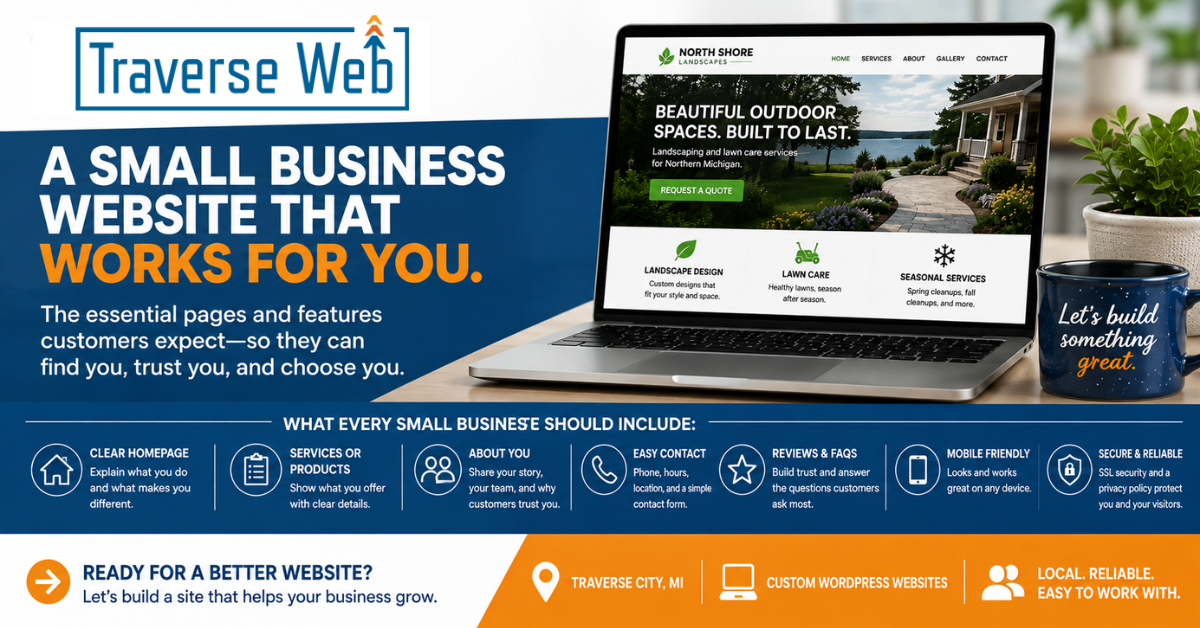
A small business website does not need to be huge or complicated to be effective. It does, however, need to answer the questions your customers are likely to have.
Think about what happens when someone hears about your business for the first time. Maybe a friend recommends you. Maybe they see your name on a sign, find you through Google, or come across your business on social media.
What do they do next?
There is a good chance they look you up online.
At that point, they are usually trying to answer some pretty basic questions. What does this business do? Can they help me? Where are they located? When are they open? What does it cost? How do I contact them? Can I trust them?
A good small business website makes those answers easy to find.
At Traverse Web, we think that is a much better starting point for website planning than worrying about flashy features or whatever happens to be popular in web design this year.
Here is what a practical small business website should include.
A Homepage That Quickly Explains What You Do
Your homepage should answer one important question almost immediately:
What does this business do?
Visitors should not have to study your homepage to figure it out.
A clear headline, a short explanation, a few well chosen images, and links to your most important services can accomplish a lot. Your homepage can then guide visitors to additional information based on what interests them.
For example, a landscaping company might introduce its lawn care, landscape design, and seasonal cleanup services on the homepage. Each section can then link to a page with more information.
You do not need to tell your entire company history on the homepage. Give visitors enough information to understand who you are, what you offer, and where they should go next.
Clear Products or Services
Once people know what you do, they usually want details.
A service business should clearly explain the services it provides. A business selling products should provide useful product descriptions, photos, pricing when appropriate, and information about purchasing or ordering.
For businesses offering several different services, individual service pages are often better than trying to squeeze everything onto one page.
A restaurant, for example, might have separate information for dining, catering, and private events. A contractor might have individual pages for remodeling, roofing, siding, and other major services.
This is helpful for customers because they can quickly find the information that applies to them. It can also give search engines a clearer understanding of what your business offers.
Most importantly, write these pages for customers.
Explain what you provide, who it is for, what customers can expect, and how they can get started.
An About Page That Actually Says Something About You
Small businesses have an advantage that larger companies sometimes struggle to recreate. There are real people and real stories behind them.
Use that.
Your About page can explain how your business started, what you believe in, who is behind the company, and what makes your approach different. If you have employees, consider including their names, photos, and short introductions.
You do not need to write a corporate biography.
Just be yourself.
People often want to know who they are considering doing business with. An authentic About page helps turn an anonymous website into a real local business.
Contact Information That Is Easy to Find
Do not make people hunt for your phone number.
Depending on your business, your website should include your phone number, business hours, physical address, service area, social media accounts, and a contact form.
Some of that information should also appear in the footer so it is accessible throughout the website.
If customers visit your location, include a map or directions. If you travel to customers instead, clearly explain the communities or geographic area you serve.
And if someone fills out your contact form, tell them what happens next.
Something as simple as, “We’ll respond within one business day,” is more helpful than submitting a form and wondering whether anyone received it.
Clear Calls to Action
A call to action simply tells someone what to do next.
That might be:
- Call for an estimate
- Schedule an appointment
- View our menu
- Request a quote
- Book your stay
- Shop our products
- Contact us
Your website visitors should not have to figure out their next step on their own.
Calls to action should be clear and descriptive. Instead of a vague button such as “Click Here,” tell people what will happen when they click it. Your research also emphasizes that every page should provide visitors with a logical next step.
That does not mean covering every page with buttons. It simply means giving visitors an easy path forward when they are ready.
Reviews and Testimonials
You can tell people your business does great work.
It is usually more convincing when your customers say it.
Customer reviews, testimonials, success stories, and case studies can help establish credibility with someone who has never worked with you before.
They do not need to dominate the website. A few genuine testimonials placed throughout relevant pages can be very effective.
If you are a newer business and do not have many reviews yet, that is fine. Start collecting them as you build your customer base and add them over time.
Frequently Asked Questions
Think about the questions customers ask you repeatedly.
Those questions belong on your website.
An FAQ section can answer questions about pricing, scheduling, service areas, warranties, reservations, delivery, returns, timelines, or anything else customers regularly want to know.
This saves customers time, and it may save you time as well. Instead of answering the same basic questions repeatedly, your website can handle some of that work for you.
An FAQ can be its own page, but it does not have to be. Sometimes it makes more sense to put relevant questions directly on individual product or service pages.
Real Photos and Useful Visuals
Good images help people understand your business.
Whenever possible, use photos of your actual business, employees, products, completed projects, restaurant, rental property, office, or whatever represents what you do.
Stock photography has its place, but authentic images can help a small business website feel much more personal.
Visuals should also have a purpose. They can show your work, explain a process, introduce your team, or give customers a better idea of what to expect.
You do not need dozens of photos on every page. Choose images that help tell the story.
Simple Navigation
Your website menu should not be a puzzle.
For many small businesses, navigation can be as straightforward as:
Home | About | Services | Blog | Contact
A larger website may need additional categories, but the same principle applies. Visitors should be able to quickly understand where information is located.
Clear, logical navigation makes it easier for people to explore your website instead of giving up because they cannot find what they need.
Creative menu names might sound interesting, but “Services” is usually more useful than making visitors guess what “Discover What We Do” means.
Clarity wins.
A Website That Works Well on Phones
Your customers are not all sitting at desktop computers.
They may be looking up your business from the grocery store parking lot, sitting in their car, walking downtown, or relaxing on the couch.
Your website needs to work just as well on a phone as it does on a larger screen.
That means readable text, buttons that are easy to tap, images that resize properly, navigation that works, and forms that are not frustrating to complete.
Mobile friendly design is no longer an extra feature. It is simply part of building a good website.
Security and Privacy
Visitors should have a secure connection when using your website.
An SSL certificate provides that encrypted connection and gives your website an HTTPS address. Your website should also have an appropriate privacy policy explaining how information collected through the site is handled.
Depending on what your website does and where your customers are located, there may be additional privacy, accessibility, or legal considerations.
These things may not be as interesting as choosing photos or designing a homepage, but they are an important part of maintaining a professional website.
Helpful Content
Not every small business needs to start a blog.
But useful content can make your website much more valuable.
A heating and cooling company could answer common furnace questions. A realtor could publish information about local communities. A restaurant could share stories about its ingredients or suppliers. A vacation rental could provide guides to nearby attractions.
Useful articles can answer customer questions, demonstrate your knowledge, and give search engines more information about your business and the topics associated with it. Your research identifies blogging as one way businesses can support search visibility while also creating information that can be reused elsewhere in their marketing.
The important word is useful.
Do not publish articles simply because someone told you every business needs a blog. Create content that your customers might genuinely want to read.
Social Media Is Helpful, but It Is Not Your Website
Facebook, Instagram, and other social networks can be excellent ways to communicate with customers.
But those platforms belong to someone else.
Your website is the online space your business controls. Social networks can change their algorithms, features, policies, and visibility rules. Your research makes an important distinction: businesses are essentially renting their presence on social platforms, while their website remains an important foundation for search visibility and their overall online presence.
Use social media to support your website, not replace it.
Your Website Should Help Your Customers
It is easy to get distracted by design trends, animations, special effects, and complicated marketing strategies.
For most small businesses, the fundamentals matter more.
Your website should clearly explain who you are, what you do, who you help, how people can reach you, and what they should do next.
It should answer common questions. It should work well on a phone. It should give people reasons to trust you. And above all, it should make doing business with you easier.
That is what we focus on at Traverse Web.
A small business website does not need to be complicated to do its job well. It needs to be clear, useful, professional, and built around the people who are actually going to use it.
Our Goal is Simple
We want your website to support your business long term, not create more technical or marketing stress for you.
If you would like help building, improving, or maintaining your website, we are here to help.
Email us at updates@traverseweb.com or call us at 231-409-5999.